The Send an invite dialog adds people to an account. It adds one person in one of three ways, or invites several people by email in one go.
¶ Where the dialog opens
- On the Users screen, select Send Invitation. The person joins the account you work in.
- On the Invitations tab of a child account, select Send Invitation. The person joins that child account. See Sub-accounts of an account.
¶ Fields for one person
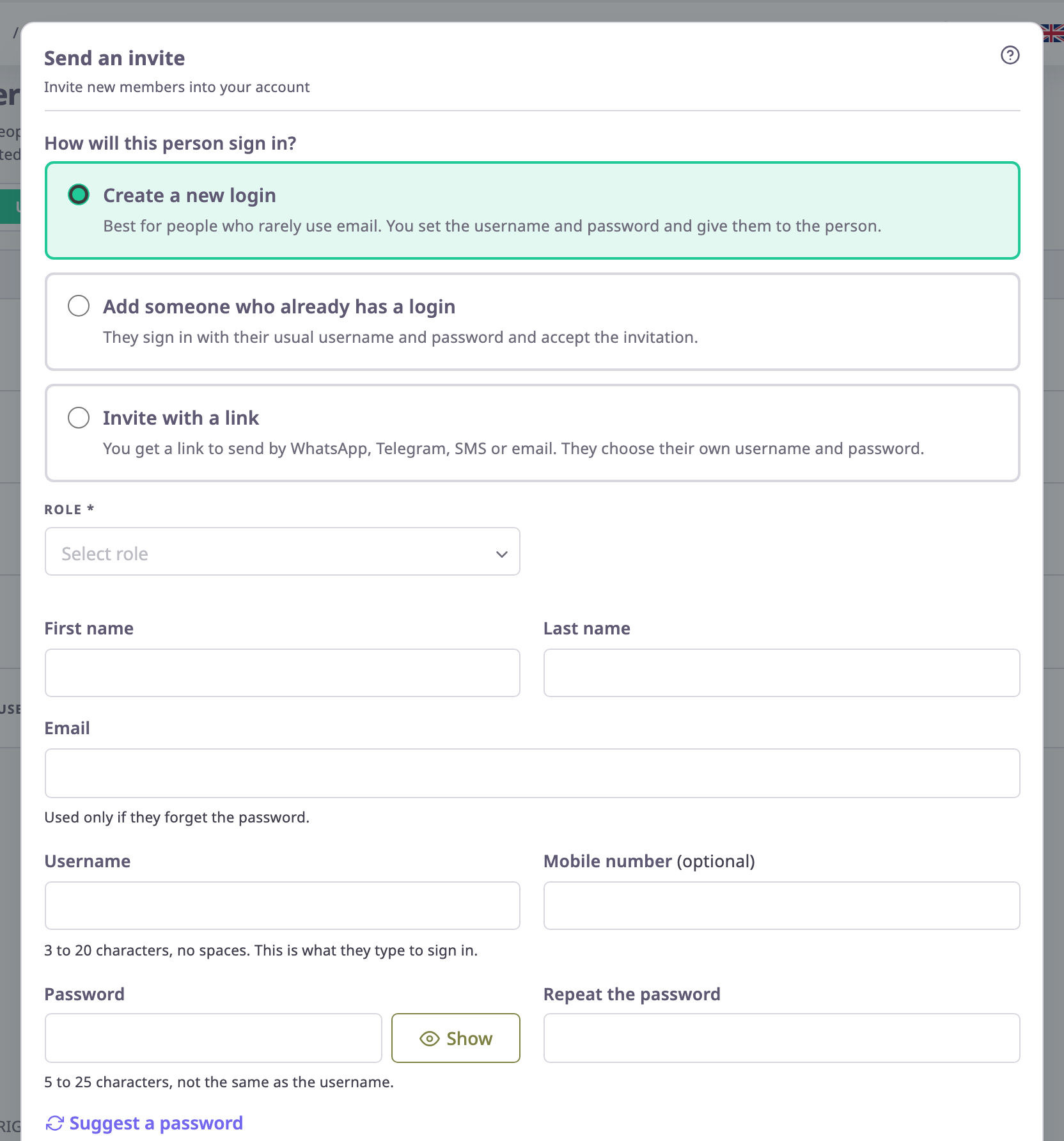
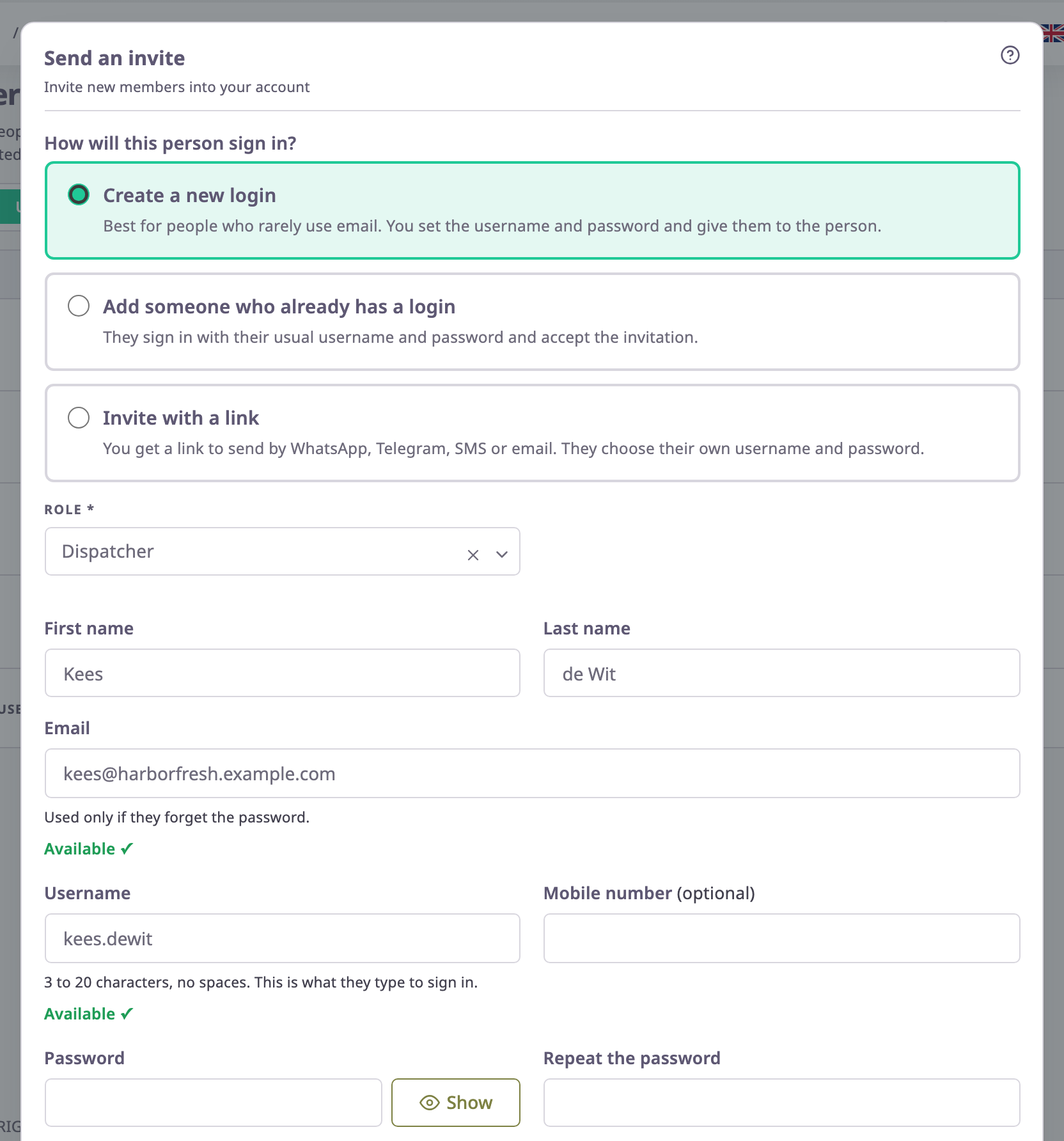
The dialog starts with How will this person sign in? and the Role. The other fields depend on the option you choose. Ways to give an owner or user access explains when to choose each one.
| Field | Required | What it does | Allowed values / example | Notes |
|---|---|---|---|---|
| How will this person sign in? | Yes | Decides how the person gets into the account. | Create a new login, Add someone who already has a login or Invite with a link | Starts on Create a new login. |
| Role | Yes | The role the person gets in the account. | One role from the list. Example: Dispatcher | The list holds the built-in roles and the roles below yours. |
| First name | Conditional | The first name on the new login. | 1 to 50 characters. Example: Kees | Required for Create a new login. |
| Last name | Conditional | The last name on the new login. | 1 to 50 characters. Example: Jansen | Required for Create a new login. |
| Conditional | The new login's email address, used if they forget the password. | A valid email address, up to 254 characters. Example: kees@harborfresh.example.com | Required for Create a new login. Saved in lower case. If another login has it, the app offers Add them as an existing user instead. | |
| Username | Conditional | What the person types to sign in. | 3 to 20 characters, no spaces | Required for Create a new login. Saved in lower case. When it is taken, the app suggests free names. |
| Mobile number | No | The mobile number on the new login. | Up to 16 characters, with the country code. Example: +31612345678 | Create a new login only. No other login may use it. |
| Password | Conditional | The person's first password. | 5 to 25 characters, not the same as the username | Required for Create a new login. Suggest a password fills in a random one; Show reveals it. |
| Repeat the password | Conditional | Catches typing mistakes. | The same value as Password | Required for Create a new login. |
| Ask to change the password at first sign-in | No | Makes the person choose their own password the first time they sign in. | On or off | Create a new login only. On by default. |
| Their email address | Conditional | The existing login the app invites. | The full email address of an active login | Required for Add someone who already has a login. Refused when the person already belongs to the account. |
| Email (link) | No | Ties the invitation link to one person. | A valid email address, or empty | Invite with a link only. Without it, anyone with the link can use it once, until it expires. |
| Also send the link by email | No | Emails the link to the address in Email as well. | On or off | Shown only when Email is filled in. On by default. |
| Action | What happens |
|---|---|
| Create login | Creates the login and adds it to the account. Shown for Create a new login. |
| Invite | Emails an invitation to the existing login. Shown for Add someone who already has a login. |
| Get the link | Creates the invitation link. Shown for Invite with a link. |
| Invite several people by email | Switches the dialog to the batch email invitation. |
| Cancel | Closes the dialog without saving. |
The send button stays unavailable until the role and the option's fields are valid. If the server refuses a value, the message "Nothing has been created yet. Fix the highlighted field and try again." appears, and the app highlights the field.
¶ After you add one person
A result dialog opens. Select Done to close it.
| Option | Dialog | What it offers |
|---|---|---|
| Create a new login | Login created | The Sign-in address, Username and Password, with Copy sign-in details and Print. The password shows only in this dialog. |
| Add someone who already has a login | Invitation sent | The Invitation link with Copy link, in case the person cannot find the email. |
| Invite with a link | Your invitation link is ready | The Invitation link, when it expires, Copy link, and WhatsApp, Telegram, SMS and Email app under Send it with. |
Share shows next to them where the browser can open the device's share menu.
¶ Invite several people by email
Select Invite several people by email to send email invitations to up to 20 addresses with one role. Add one person instead switches back.
| Field | Required | What it does | Allowed values / example | Notes |
|---|---|---|---|---|
| Emails (Add up to 20 emails)* | Yes | Each address receives its own invitation email. | 1 to 20 valid email addresses. Example: kees@harborfresh.example.com | Enter an address and press Enter or Tab, or paste several separated by commas or spaces. Each address becomes a tag. The app saves addresses in lower case and skips repeats. |
| Role | Yes | The role every invited person gets in the account. | One role from the list. Example: Dispatcher | — |
Select Invite to send. The app shows "Invitation sent successfully", and the dialog changes to a list titled "Successfully sent an invitations". A note suggests checking the spam folder, or sending the link by WhatsApp, Telegram or SMS. For each address it shows:
| Column | What it shows |
|---|---|
| User Name | The person's name if they already have a user, otherwise the address. |
| Invitation Url | The invitation link with Copy link. Accepted shows instead when the person already belongs to the account. |
Select Close to return to the list.
What the app does per address:
| The address | What happens |
|---|---|
| Has no invitation to this account yet | The app creates an invitation that is valid for 30 days and emails it. |
| Has a pending invitation | The app emails the same link again and makes it valid for 30 days from now. |
| Has an expired or declined invitation | The app reopens it, emails the same link again and makes it valid for another 30 days. |
| Belongs to someone who already accepted | The app sends nothing and shows Accepted. |
¶ Limits and validation
| Situation | What you see |
|---|---|
| A batch address is not valid | It stays in the input, and the message "Please enter valid email." appears. |
| You add a 21st batch address | The app drops it and shows "You can send a maximum of 20 invitations." |
| The same batch address twice | The app keeps one. |
| A required field is empty | "Please fill this in." under the field. |
| The two passwords differ | "The two passwords do not match." |
¶ Permissions
- On your own account you need User Invite > Send.
- On a child account you need Consumer Account User Invite > Send, or Dealer Account User Invite > Send for a sub-dealer.
- The built-in Owner role has them.