The consumer account form creates a consumer account or changes one. A dealer uses it for its customers. The owner of a consumer account uses it for sub-consumers, such as a subsidiary.
- To create one, in the side menu, select Accounts > Consumers. Select Add Consumer. The Add New Consumer Account form opens.
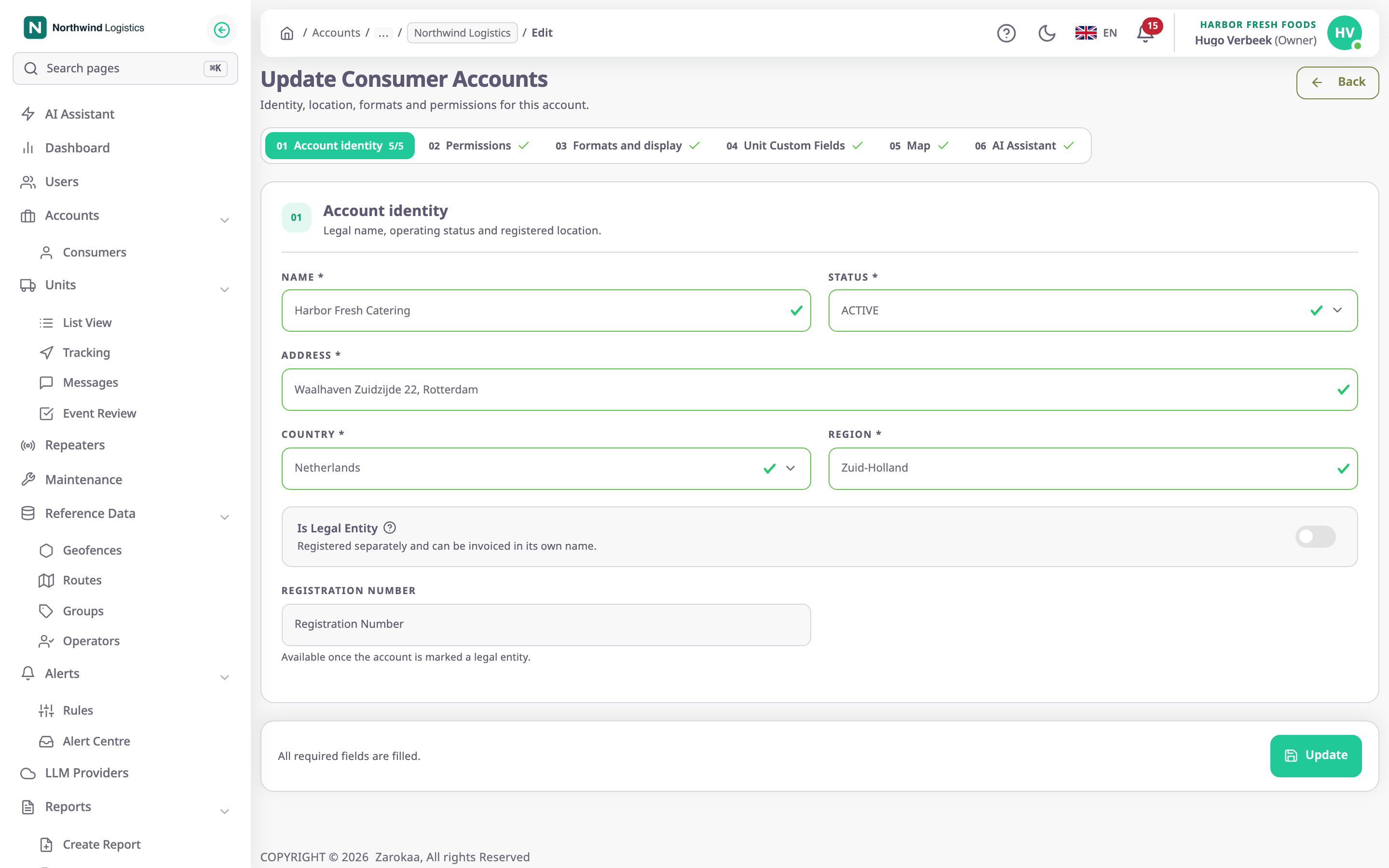
- To change one, select Edit on its row in Consumers or in the Account Tree View. The form's title reads "Update Consumer Accounts".
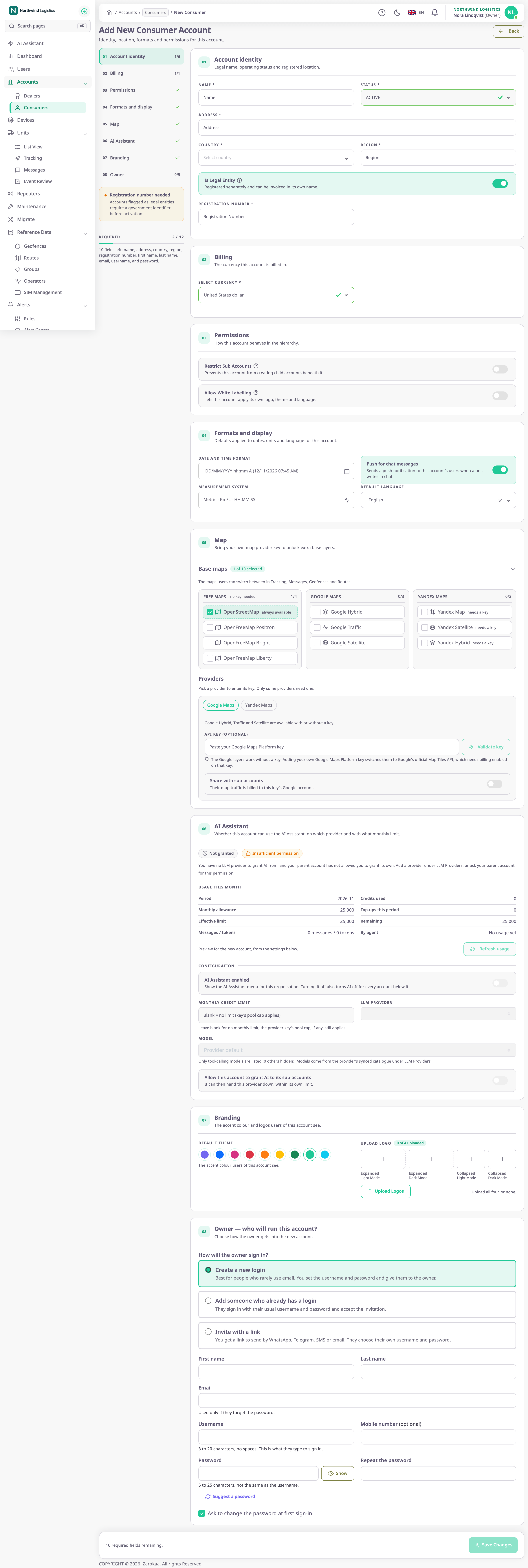
The rail on the left lists the sections and counts the required fields in each. Required below it names the fields still missing.
¶ Fields
| Field | Required | What it does | Allowed values / example | Notes |
|---|---|---|---|---|
| Name | Yes | The account's name in every list, the account tree and the account picker at sign-in. | Up to 50 characters; a new account needs at least 3. Example: Delfshaven Deliveries | A new account needs a name no other consumer account has, ignoring capitals. |
| Status | Yes | Whether the account's users can work. | ACTIVE, INACTIVE, BLOCKED | Locked to ACTIVE on create; editable on the edit form. |
| Address | Yes | The account's postal address. | Up to 80 characters; a new account needs at least 5. Example: Havenstraat 4, Rotterdam | — |
| Country | Yes | The country of the account's registered address. | A country from the list. Example: Netherlands | — |
| Region | Yes | The state, province or region. | Up to 30 characters; a new account needs at least 3. Example: Zuid-Holland | — |
| Registration Number | Conditional | The company registration number. | Up to 30 characters, no spaces. Example: NL13572468 | Required and editable only while Is Legal Entity is on. No other account may have the same number. |
| Select Currency | Yes | The currency of the account's bills. | A currency from the list | Create only, in the Billing section. Starts as United States dollar. |
| How will the owner sign in? | Yes | Decides how the owner gets into the new account. | Create a new login, Add someone who already has a login or Invite with a link | Create only, in the last section, Owner — who will run this account? Starts on Create a new login. See Ways to give an owner or user access. |
| First name | Conditional | The owner's first name on their new login. | 1 to 50 characters. Example: Joris | Required for Create a new login. |
| Last name | Conditional | The owner's last name on their new login. | 1 to 50 characters. Example: Bakker | Required for Create a new login. |
| Conditional | The new login's email address, used if the owner forgets the password. | A valid email address, up to 254 characters. Example: joris@delfshaven.example.com | Required for Create a new login. Saved in lower case. If another login already has it, the app offers Add them as an existing user instead. | |
| Username | Conditional | What the owner types to sign in. | 3 to 20 characters, no spaces | Required for Create a new login. Saved in lower case. No other login may have it; when it is taken, the app suggests free names. |
| Mobile number | No | The owner's mobile number on the new login. | Up to 16 characters, with the country code. Example: +31612345678 | Create a new login only. No other login may use it. |
| Password | Conditional | The owner's first password. | 5 to 25 characters, not the same as the username | Required for Create a new login. Suggest a password fills in a random one; Show reveals it. |
| Repeat the password | Conditional | Catches typing mistakes. | The same value as Password | Required for Create a new login. |
| Ask to change the password at first sign-in | No | Makes the owner choose their own password the first time they sign in. | On or off | Create a new login only. On by default. |
| Their email address | Conditional | The login the app invites to own the account. | The full email address of an active login. Example: joris@delfshaven.example.com | Required for Add someone who already has a login. The app checks it while you type. You cannot use your own login. |
| Email (link) | No | Ties the invitation link to one person. | A valid email address, or empty | Invite with a link only. Without it, anyone with the link can use it once, until it expires. |
| Also send the link by email | No | Emails the link to the address in Email as well. | On or off | Shown only when Email is filled in. On by default. |
| Restrict Sub Accounts | No | Stops the account from creating sub-consumers, and hides Consumers from its users. | On or off | Off by default. Not shown on your own Account Settings. |
| Is Legal Entity | No | Marks the account as a registered business. Lists then show it as Business. | On or off | On by default for a new account. |
| Allow White Labelling | No | Lets the account set its own theme, logos and default language. | On or off | Shown only when your own account may white-label. |
| Date and Time Format | No | How dates and times show for the account's users, and its time zone. | A format from the list or a custom one, and a time zone | See Set the date, time and unit formats. |
| Measurement System | No | The units for distance, fuel, fuel economy and engine hours. | Metric, Imperial or US Customary | — |
| Default Language | Yes | The language the app uses for the account's users until they choose one. | A language the app offers | Shown only when your own account may white-label. |
| Default Theme | No | The accent colour the account's users see. | Purple, Blue, Pink, Red, Orange, Yellow, Green, Teal or Cyan | Shown only when your own account may white-label. |
| Upload Logo | No | The four side-menu logos. | Four PNG or JPG files under 2 MB each, or none | See Dealer account form for the logo dialog. |
¶ Create versus edit
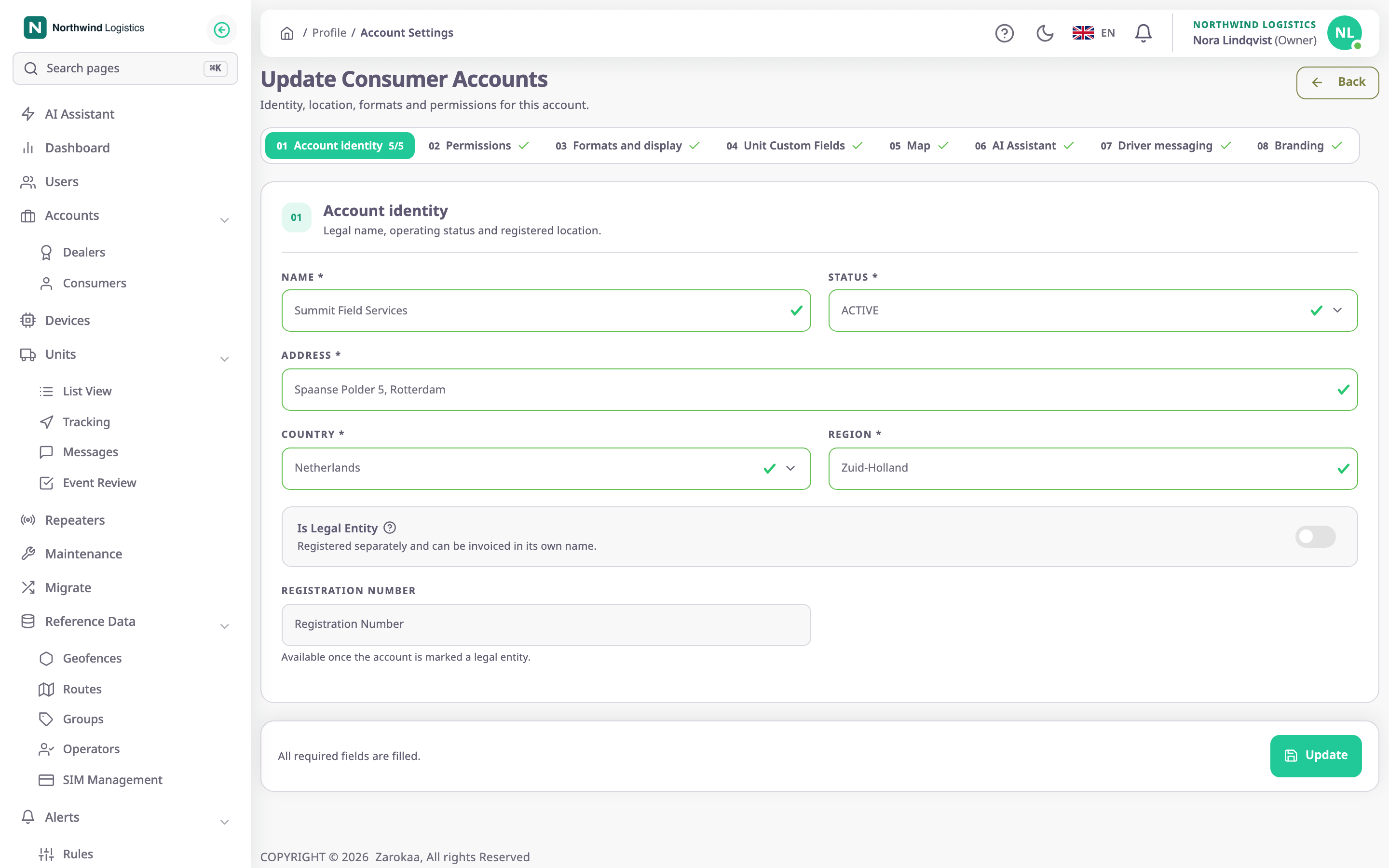
| Item | Add New Consumer Account | Update Consumer Accounts |
|---|---|---|
| Status | Locked to ACTIVE | Editable |
| Billing and Owner — who will run this account? sections | Shown | Not shown |
| Map section | Shown: choose base maps and enter map provider keys | Shown as the Map tab |
| Unit Custom Fields | Not shown | Shown as a tab |
| Driver chat | Not shown | Shown as a tab, for dealers whose licence includes messaging |
| Layout | One long form with a rail of sections on the left | One section at a time, with a tab strip at the top |
| Save button | Save Changes | Update |
| After saving | A dialog shows the owner's sign-in details or invitation link. After Continue, the app shows "Consumer created successfully" and opens the Consumers list. | The app shows "Account Update Successfully" and returns to where you came from. |
The Map, Unit Custom Fields and Driver chat sections work as on Account Settings. See Account Settings and Set up driver chat for an account.
A consumer owner whose account may not white-label sees no Allow White Labelling, Default Language or Branding section.
¶ Buttons and actions
| Action | What happens |
|---|---|
| Save Changes | Creates the account and the owner's access. Unavailable until every required field is valid, the owner option is complete, the registration number is there when needed and the logos are all or none. |
| Update | Saves the changes to an existing account. |
| Back | Leaves the form without saving. |
If the account above yours restricted your account, saving a new consumer fails with the message "Consumer creation has been restricted".
If the server refuses the owner details, the message "Nothing has been created yet" appears and the app highlights the field to fix.
¶ Permissions
- Add Consumer and this form need Add Consumer Accounts; below a child account, Add Consumer Sub Accounts.
- Edit needs Update Consumer Accounts, or Update Consumer Sub Accounts one level further down.
- The built-in Owner role has these permissions, in dealer and consumer accounts alike.