A rule checks its condition against your units' data. When the condition comes true, and stays true for any confirmation time you set, the rule opens an incident. The incident stays open until the condition clears or someone resolves it. The Firing policy section of the rule form decides the details.
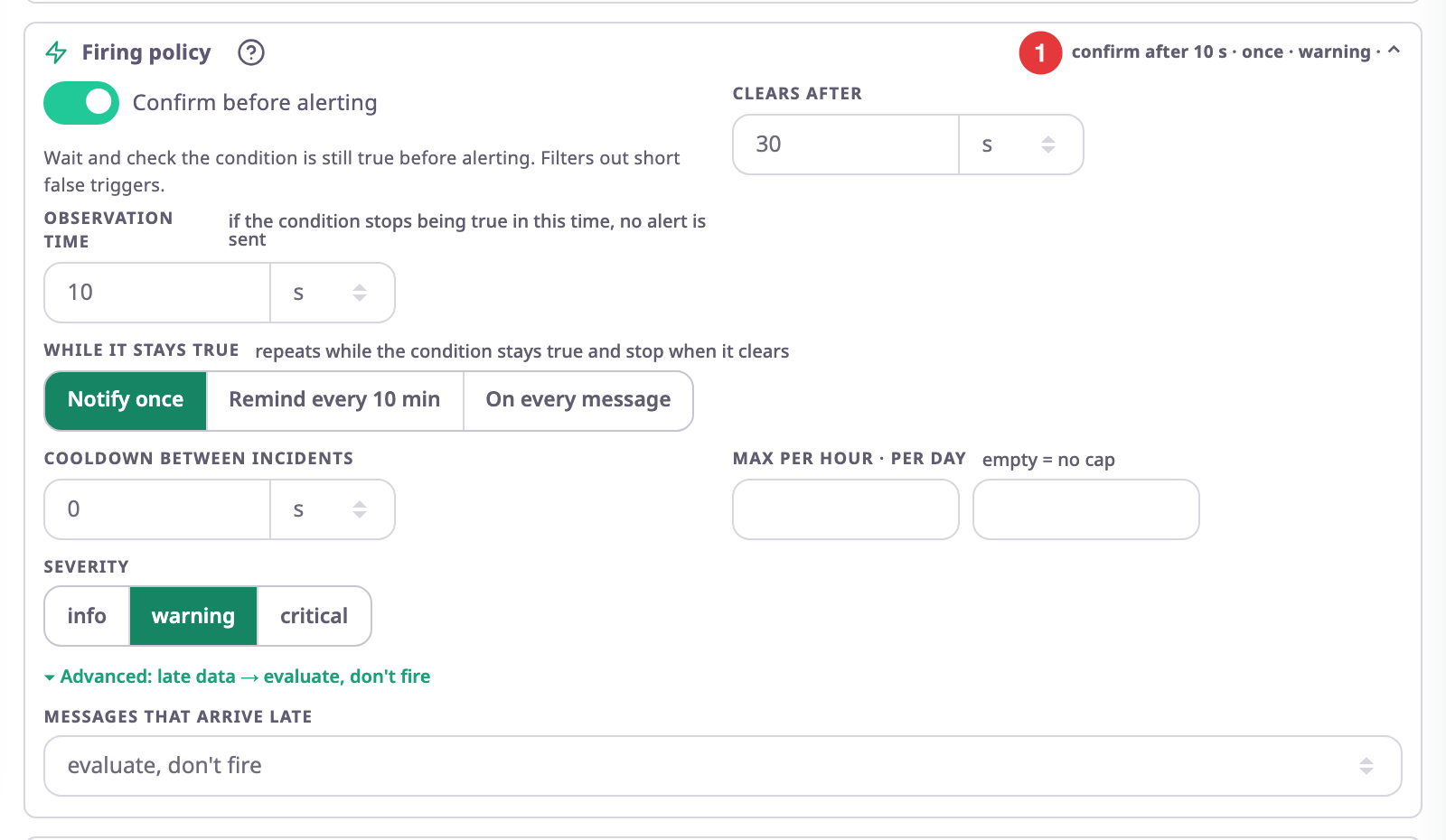
The summary at the top right of the section, marked 1, reads the policy back to you, for example "confirm after 10 s · once · warning". Without a confirmation time it reads "alert immediately".
¶ Device scope and unit scope
Scope · evaluated decides what one incident stands for:
- Device: one incident per device. A unit with two trackers can have two incidents for the same rule.
- Unit: the unit's devices count as one. One incident per unit.
Each template sets a default. Driver, route and fleet templates use Unit; most others use Device.
Some templates can split further. One incident per appears when the template offers it; for example, a unit inside two geofences then opens two incidents.
¶ When a rule checks its condition
Each template checks at its own pace. The rule form shows it next to the scope:
| Shown | When the rule checks |
|---|---|
| per message | Every time the device sends a message. |
| per message, as a sequence | On every message, against the events before it. |
| from intervals, ≤ 2 min lag | After the app has worked out a trip, stop or visit, up to two minutes later. |
| every 30 s from aggregates | Every 30 seconds, from daily or weekly totals. |
| every 30 s across the fleet | Every 30 seconds, across all the units the rule watches. |
| timer | On a timer, for example when a device has been silent for a set time. |
| every minute, from records | Every minute, from stored records such as maintenance reminders. |
| every 15 min from the SIM registry | Every 15 minutes, from the SIM cards and recharges in SIM management. |
¶ Confirming and clearing
With Confirm before alerting on, the condition must stay true for the Observation time before the incident opens. If it stops being true in that time, no alert is sent. This filters out short spikes, such as a second of speed over the limit. With the switch off, the incident opens on the first message that meets the condition.
For a template that fires on a one-off event, the switch is unavailable: there is nothing to keep checking.
¶ When Confirm before alerting is unavailable
On some templates, you cannot turn on Confirm before alerting. The form shows "Not available for this alert: it is a one-off event, so there is nothing to keep checking."
Confirmation needs a condition that can stay true, such as "the speed is over 90 km/h". The app can keep checking it on each new message for the observation time. A one-off event is true on one message only: the device reports a harsh brake, a command fails, a counter passes a value. On the next message the condition is false again, even though the event really happened. Confirmation would therefore never succeed, and the rule would never alert. The app turns the switch off rather than let you save a rule that can never fire. The server also refuses such a rule.
Some events have a state to check, so they keep the switch. Ignition off happens once, but the app can check that the ignition stays off. Geofence entry can check that the unit stays inside. On those templates, confirmation filters out a short flick of the ignition or a GPS jump across the fence line.
The switch is unavailable on these templates:
| Group | Templates | Why there is nothing to keep checking |
|---|---|---|
| Fuel | Fuel theft, Fuel refill | The fuel detector reports the event once per stage. It confirms the event itself, by waiting for the level to settle. Tune it with Minimum confidence instead. See How fuel theft and refill confidence works. |
| Driving behaviour | Harsh braking, Harsh acceleration, Harsh turn | The device reports the event on one message. To alert only when it keeps happening, use Repeated harsh driving. |
| GPS quality | GPS jump | The jump is a comparison between two positions, true on one message. |
| Counters | Mileage counter reached, Engine hours reached | The counter passes the value once. |
| Sensors | Parameter change | The change is between two messages. To alert on a value that stays out of range, use Parameter range or Parameter threshold. |
| Routes | Checkpoint reached, Checkpoint left, Checkpoint missed, Ride activated, Ride started, Ride finished | The route engine reports each of these once. |
| System | Command failed, Command succeeded, Command reply, Driver assigned, Driver unassigned | Each is a single action or reply. |
| Apps | App event | The app reports the event once. |
| Patterns | Dwell after event, Event sequence, Repeated incident | The pattern is matched once, and already includes its own time window. |
A Custom rule loses the switch when its condition compares with the previous message, reads a reported event or matches a pattern.
These templates fire each time the event happens. To limit how many alerts you get, use Cooldown between incidents and the hourly or daily caps. See Cooldown and caps.
Clears after is how long the clear condition must stay true before the incident clears. Some templates have their own clear condition; the form then says "uses the template's clear condition". For example, Speeding clears when the speed is back at or under the limit. Other templates clear as soon as their condition is no longer true.
If the condition comes true again while the incident is clearing, the incident stays open.
¶ Repeats while the condition stays true
While it stays true decides what happens after the incident opens and the condition stays true:
| Option | What happens |
|---|---|
| Notify once | Nothing more until the incident clears. |
| Remind every n | The rule notifies again at that interval, at least one minute apart. |
| On every message | The rule notifies again on every message that still meets the condition. |
Alerts that fire each time something happens, such as the ignition turning off, have no repeat options; the section says so instead.
A repeat does not open a new incident. It adds a fire to the same incident; Fires in the Alert Centre counts them.
¶ Cooldown and caps
- Cooldown between incidents: after an incident closes, a new incident for the same device or unit within this time still opens, but sends nothing.
- Max per hour · per day: the most fires the rule sends for one device or unit in an hour or a day. Fires over the cap still count, but send nothing. Empty means no cap. The hour runs in UTC; the day rolls over at local midnight.
An incident whose actions were held back shows the status suppressed. Suppressed today in the Alert Centre counts these, by reason.
¶ Severity
Every rule has a severity: info, warning or critical. Each template sets a default; you can change it.
Severity decides which channels reach each person. Every user chooses, per severity, which of Push, Email and In-app they want. By default:
| Severity | Channels a user gets by default |
|---|---|
| critical | Push, Email, In-app |
| warning | Push, In-app |
| info | In-app |
So a warning rule with Email turned on still sends no email to users who kept the default. Critical alerts always reach In-app, and can come through quiet hours.
See Alert preferences.
¶ Schedules
A rule with Only during these hours turned on sends nothing outside its days and hours. It still checks the condition. An incident that opens outside the window opens without sending anything. The window runs in your account's time zone.
¶ Late data
Devices sometimes send stored messages later, for example after a tunnel. Messages that arrive late, under Advanced, decides what the rule does with them:
| Option | What happens |
|---|---|
| evaluate, don't fire | The default. The rule checks the message and can open or clear incidents, but sends nothing for it. |
| fire as usual | The rule treats the message like any other. |
| ignore | The rule skips the message. |
¶ The life of an incident
| Status | Meaning | What changes it |
|---|---|---|
| open | The condition is true and nobody has acknowledged it. | Acknowledge, resolve, or the condition clears. |
| suppressed | Open, but its last fire sent nothing because of a schedule, cooldown, cap, late data or quota. | As open. |
| acknowledged | Someone took ownership. Pending escalation steps stop. | Resolve, or the condition clears. |
| cleared | The condition is no longer true. The app closed it. | Final. |
| resolved | Someone closed it by hand, often with a comment. | Final. |
A rule that someone turns off keeps its open incidents until they clear.
See Acknowledge and resolve incidents.